REGTRAX
development
Don't just write regex. Replay it. Turn any regular expression into an animated railroad diagram with live testing.
Every codebase has that one regex nobody touches. REGTRAX turns it into a visual circuit board — colour-coded nodes, animated traversal, and instant feedback on match or failure. Describe what you want to match in plain English, and Claude writes the regex and visualises it in your browser.
The Problem REGTRAX Solves
You wrote a regex. You can't explain it. Neither can the person who has to maintain it after you leave.
Traditional regex debugging means staring at character soup, mentally simulating state transitions, and guessing why user@domain.co.uk matches but user@domain doesn't. REGTRAX makes the invisible visible.
Usage
Point Claude at a regex or describe what you want to match. REGTRAX generates a structured JSON analysis and serves it as an interactive HTML page on localhost.
What You See
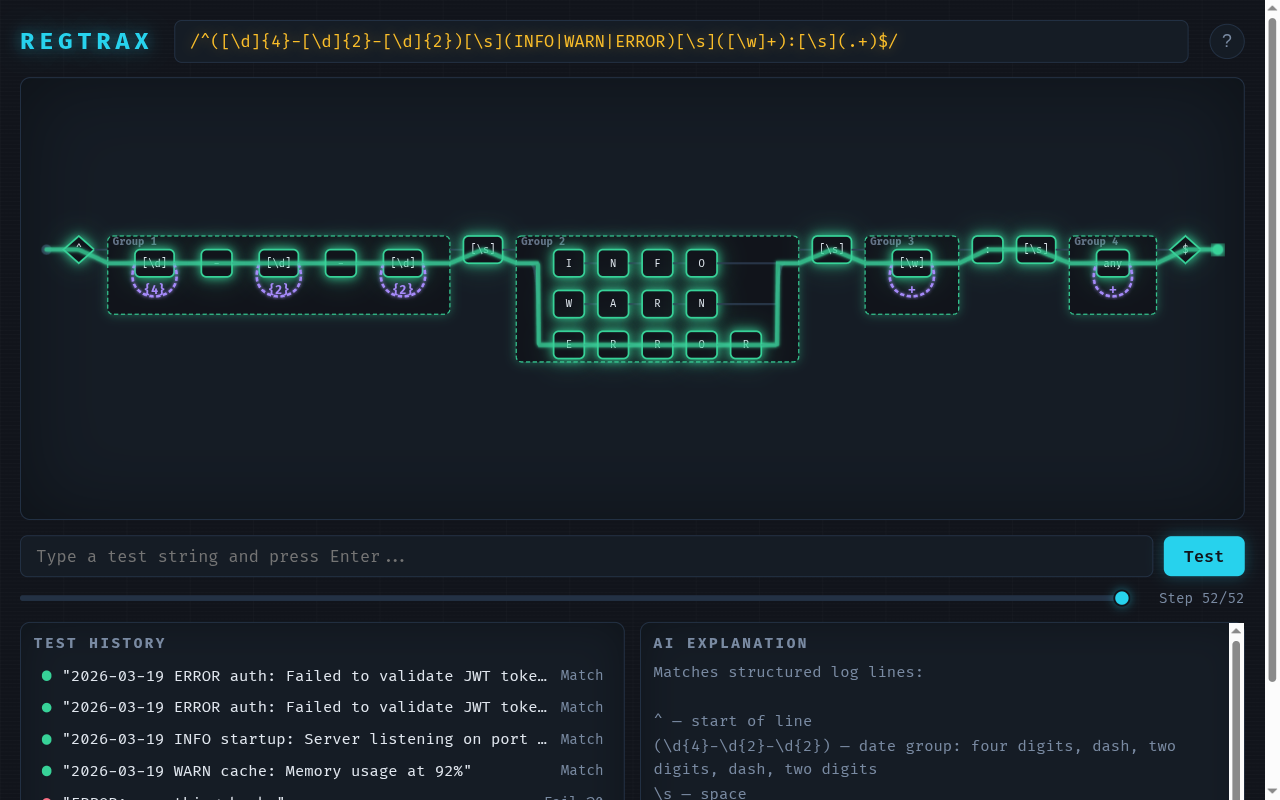
A dark-themed railroad diagram with colour-coded nodes. Type a test string and watch a photon walk the track — tracing the exact path the regex engine takes through your pattern.
- Match: Green pulse, all tracks light up, photon reaches the end anchor
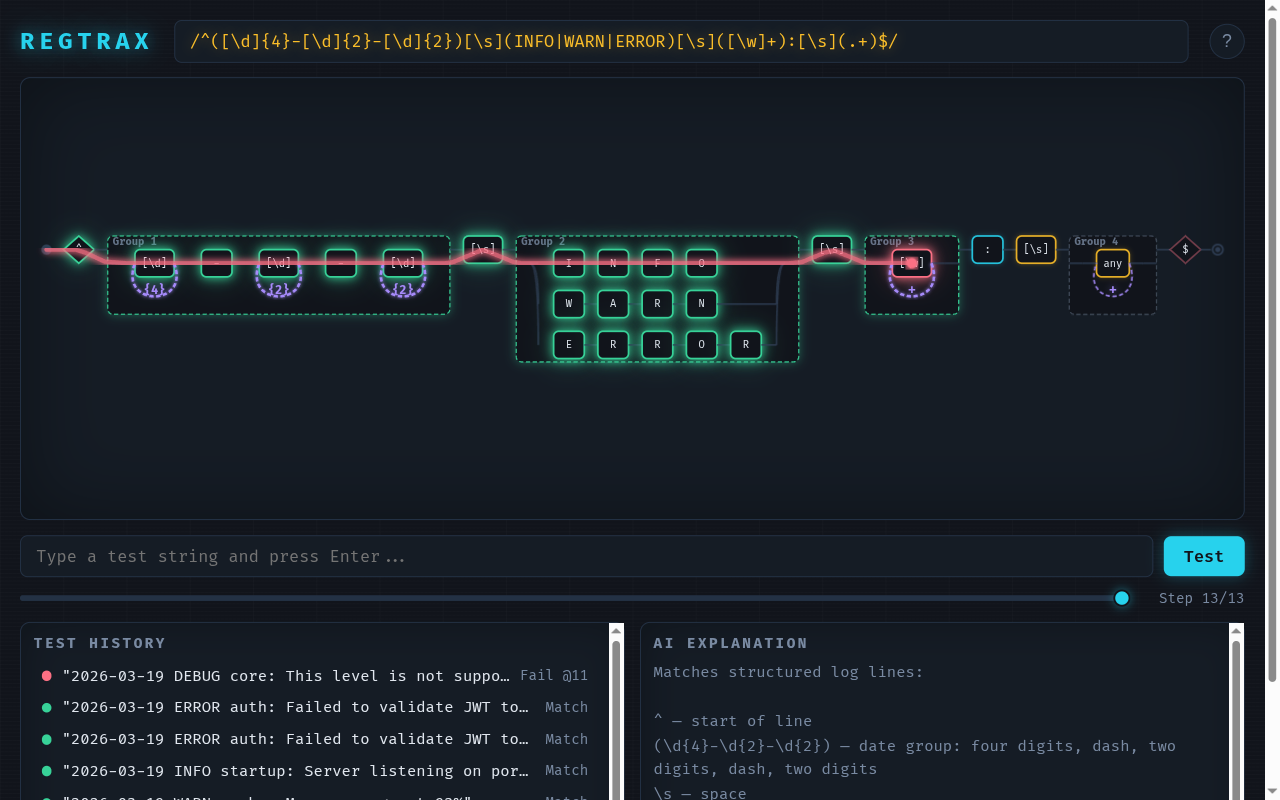
- Fail: Red photon derails at the exact character where the match breaks
The Railroad Diagram
Every regex element gets a visual node, colour-coded by type:
| Node Type | Colour | Examples |
|---|---|---|
| Literals | Cyan | a, @, : |
| Character classes | Amber | [a-z], \d, \w |
| Quantifiers | Violet | +, *, {2,4} |
| Groups | Emerald | (abc), (?:xyz) |
| Anchors | Rose | ^, $, \b |
Tracks connect nodes. Alternation branches fork visually. Quantifier loops show the repetition path. The diagram reads left-to-right, exactly how the regex engine processes the string.
Photon Traversal
The signature feature. Type a test string and hit Test:
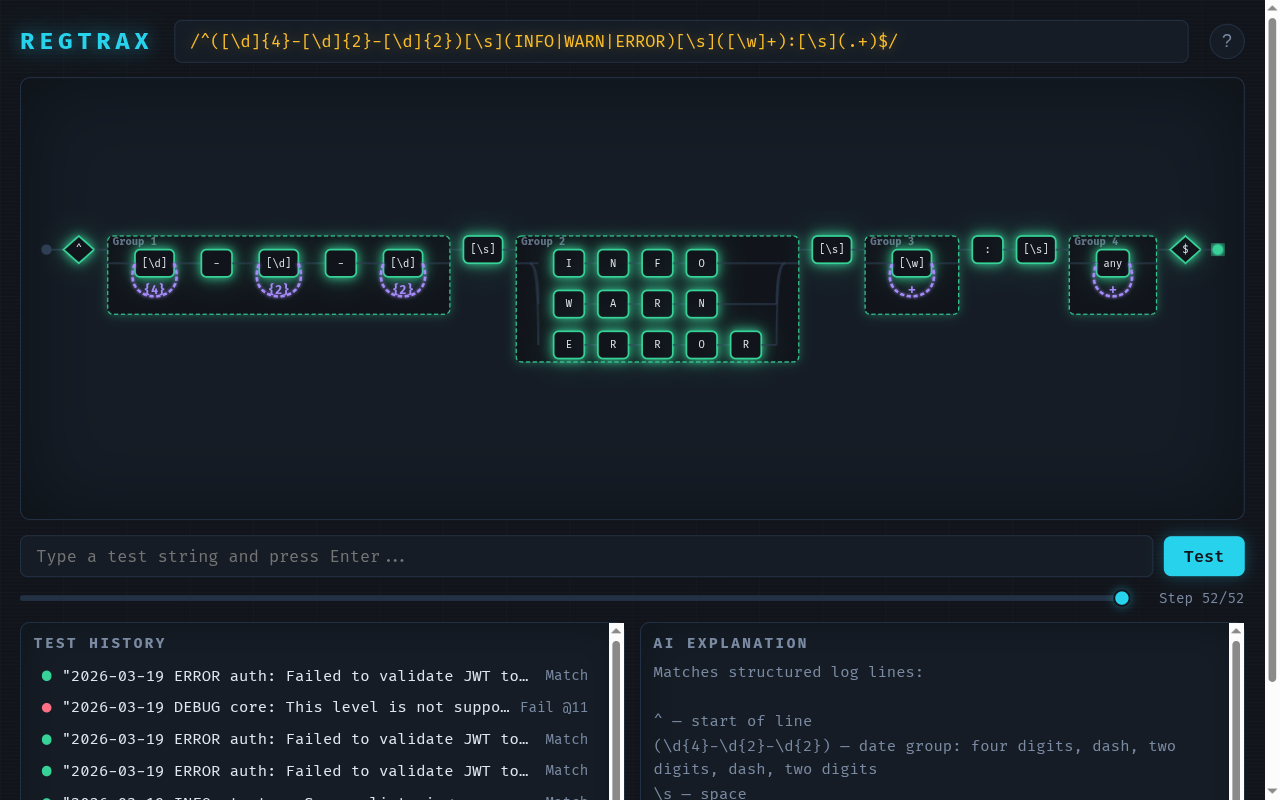
- A cyan photon appears at the START anchor
- It walks the track, lighting up each node as it passes
- At alternation branches, you watch it choose the right path
- Through quantifier loops, you see it circle back
- On match: photon reaches END, all tracks pulse green
- On fail: photon turns red, derails with a gravity fall at the exact failure point
You can also scrub through the animation step-by-step using the timeline slider.
Live Iteration
The real power is the feedback loop:
- You describe what to match
- Claude writes the regex and generates the diagram
- You test strings in the browser
- Something fails — you see exactly where
- You tell Claude what's wrong
- Claude updates the pattern — the diagram morphs in place (no refresh, no rebuild)
- You retest — green this time
The browser polls for changes every 500ms. Update data.json, and the diagram morphs automatically.
The data.json Contract
REGTRAX uses a simple open contract. Claude generates a JSON file, the HTML template renders it:
{
  "pattern": "^\\d{4}-\\d{2}-\\d{2}$",
  "flags": "",
  "explanation": "Matches dates in YYYY-MM-DD format:\n- ^ anchors to start\n- \\d{4} matches four digits (year)\n- - matches literal hyphens\n- \\d{2} matches two digits (month, day)\n- $ anchors to end",
  "testCases": [
    { "input": "2024-03-15", "shouldMatch": true },
    { "input": "24-3-15", "shouldMatch": false }
  ]
}
Any AI tool that can write this JSON can drive REGTRAX. The template is completely standalone.
Parser Coverage
The built-in parser handles the full range of common regex features:
| Feature | Supported |
|---|---|
Literals, escaped chars (\d, \w, \s) |
Yes |
Character classes ([a-z], [^0-9]) |
Yes |
Hex/Unicode escapes (\xFF, \uFFFF) |
Yes |
Quantifiers (?, *, +, {n,m}) |
Yes |
Lazy quantifiers (*?, +?) |
Yes |
| Groups (capturing, named, non-capturing) | Yes |
Backreferences (\1-\9) |
Yes |
Alternation (a|b|c) |
Yes |
Anchors (^, $, \b) |
Yes |
Lookahead ((?=), (?!)) |
Yes |
| Lookbehind | Not yet |
Unicode properties (\p{L}) |
Not yet |
Prerequisites
- Python 3 (for
http.server— serves the template locally) - A modern browser (Chrome, Firefox, Safari, Edge)
No npm, no build step, no CDN. One HTML file, one JSON contract.
Tips
Natural language first
You don't need to know regex syntax. Describe what you want to match in plain English — "match phone numbers with optional country code" — and let Claude write the pattern. The diagram helps you verify it does what you asked.
Test the edge cases
The test input is where the learning happens. Try strings that should match, strings that shouldn't, and strings you're not sure about. The photon shows you exactly what the regex thinks.
Iterate in conversation
When something fails, tell Claude what went wrong. It updates the pattern, the diagram morphs, and you retest — all in the same session, no context lost.
Pair with REFRAX
Use REGTRAX for regex patterns and REFRAX for full code analysis. Together they cover pattern-level and logic-level visual comprehension.